Record a chat story video in your browser
A texting story video shows a conversation unfolding message by message, with typing dots before each reply. It is a popular format on short-video feeds because the reader cannot skip ahead: the next message arrives when you decide.
Matat's Video tab turns any chat you have built into such a video. It renders every frame in your browser and records a vertical 720×1280 clip in the 9:16 shape. There is a longer explainer on the chat story video maker page; this lesson gets you from chat to file.
Step by step
Write the chat with pacing in mind
Build the conversation as usual. Short messages work best in video, because each one gets its own moment on screen. Split a long reply into two or three bubbles from the same sender so the typing dots appear between them and build suspense.
Open the Video tab and set the speed
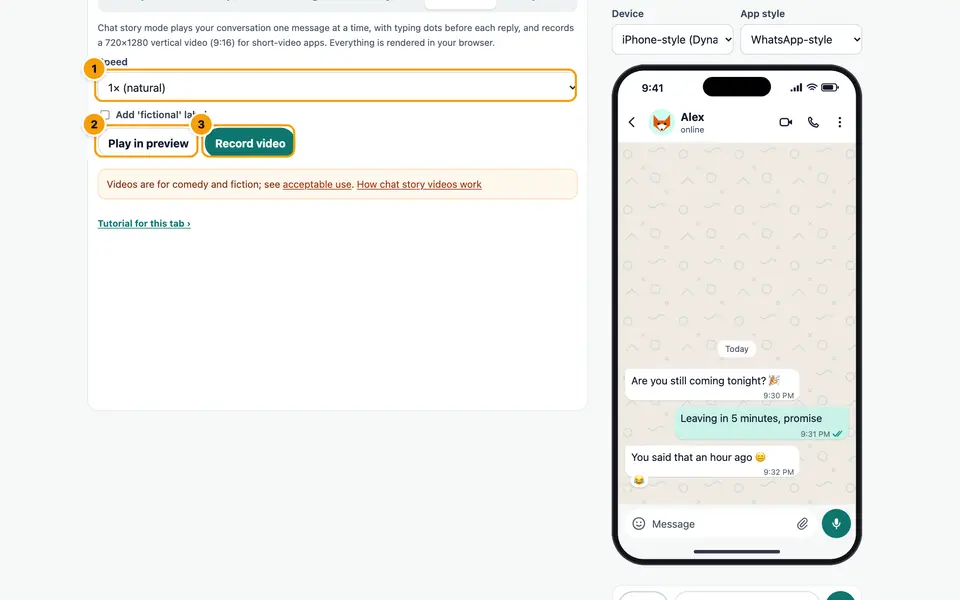
Click Video. The Speed menu goes from 0.5× (slow) through 1× (natural) to 3× (fast). The natural speed gives each message time based on its length; 1.5× suits quick jokes, 0.75× suits dramatic stories with longer messages.
Preview the timing
Press Play in preview. The phone empties and replays the chat one message at a time, with typing dots before each one. Watch it once with fresh eyes. If a punchline arrives too fast, add a short message before it or slow the speed. Press Play again as often as you like; nothing is recorded until you press Record.
Record the video
Press Record video. Matat prepares each frame, then records it, showing progress such as "Recording 7 of 20". A chat of about twenty messages usually takes well under a minute. When it is done, a Download video button appears with a WebM file.
Add the label if needed and post
Tick Add 'fictional' label before recording to show a small "Made with matatapp.com · fictional" mark under the phone on every frame. It is off by default. Most video editors and many apps accept WebM directly; if yours does not, convert it with a free converter on your device.
Browser support and the fallback
Recording uses the browser's MediaRecorder on a canvas. Current Chrome, Edge and Firefox support it. Safari, especially on older phones, may not offer it. In that case Matat shows a short note instead of failing: press Play in preview and capture the phone with your device's built-in screen recorder, then crop the clip to 9:16 in any editor. You can always export a PNG as well.
Making the story land
Open with a hook in the very first message. Keep the cast small, two or three people, so viewers do not have to read names. Use reply quotes for callbacks and a reaction on the final message as the visual punchline. The guides have more pacing advice, and the group templates on the templates page are built to be recorded.
Choose the look before you record. A dark Discord-style or a bright WhatsApp-style chat feel very different on a feed; see devices and app styles.
Keep it fiction
Chat story videos travel far and lose their context quickly. Stick to clearly made-up stories, never use real people's names or faces without permission, and consider the label for anything that might be taken as a real leak or confession. Our acceptable use rules apply to videos too.
Questions
What size and format is the video?
A vertical 720×1280 (9:16) WebM file, rendered entirely in your browser.
Does the video have sound?
No. Add music or a voice-over in your video editor or the app you post to.
Why is there no Record button result in my browser?
Some browsers, often Safari, do not support canvas recording. Use Play in preview with your screen recorder instead.